Achieve balance and well-being with Latest technologies. TimeCraft guides you through sustainable lifestyle changes to help you reach your health and wellness goals.
Start your better life today
Manage Your Whole Life
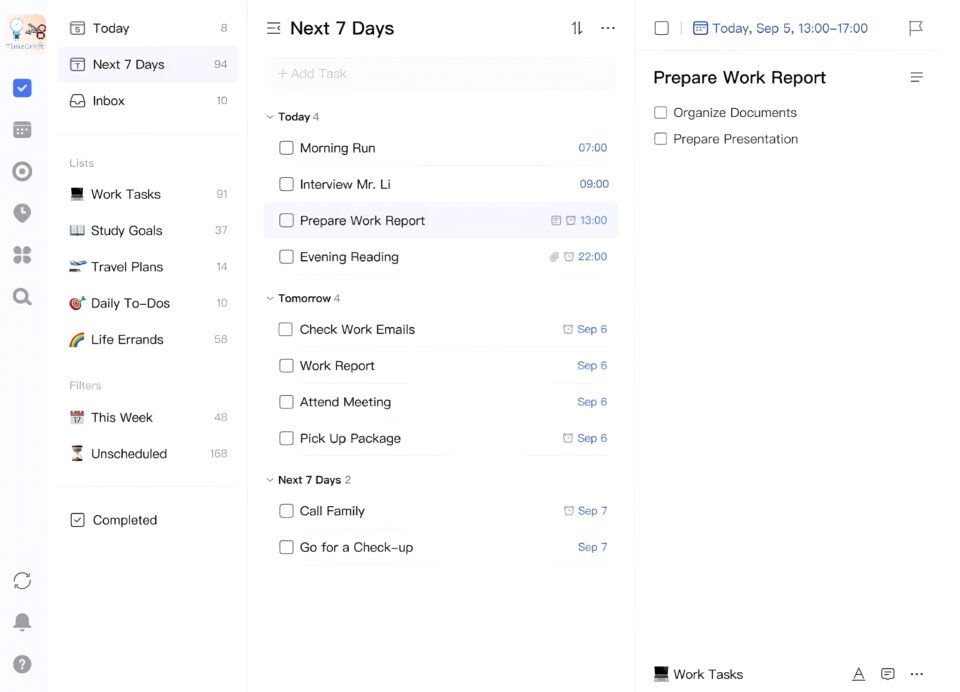
To Do List
Whether it’s the arrangement of work projects, personal errands, study plans for exams, or travel itineraries, use it! It helps you manage easily, plan efficiently, and cope calmly.
√ Today
√ Next 7 Days
√ Completed
Calender View
Choose from a variety of calendar views, including monthly, weekly, daily, schedule, and multi-day/week views, to comprehensively help you better arrange your schedule and make your time planning clear.
Pomodoro Focus
Combined with the globally popular time management method – the “Pomodoro Technique”, break complex tasks into shorter time intervals and stay focused for 25 minutes to enter a state of flow in your work
Habit Tracking
A rich habit library, flexible tracking methods, and a thoughtful data review function. They are like reliable assistants to help you easily develop good habits and start a wonderful life.
Eisenhower Matrix
Visually clarify the importance and urgency of tasks by categorizing them into four quadrants based on the Eisenhower Matrix (also known as the Urgent-Important Matrix), aiding in better schedule planning.
Create highly focused environments with intelligent environment monitoring and AI camera focus analysis. Real-time device synchronization and visualization of task progress enable collaborative focus across regions, and efficiency leaderboards promote competition. It’s ideal for test preparation or remote work – every minute of focus is an important step towards growth
IoT and AI auto-decompose tasks, prioritize workflows, and trigger risk alerts. Smart boards track progress, annotate tasks, and sync updates. Cross-scenario collaboration bridges online/offline teams for seamless file transfers, mock interviews, and complex workflows—turning team execution into quantifiable efficiency curves.
Dynamic scoring like double points for timely high-difficulty tasks, delayed tasks trigger point deductions. Unlock badges like “Flow Master” or “Lightning Executor” via IoT-verified behavior data. Redeem rewards and track daily/weekly/monthly efficiency tiers—transforming consistency into tangible badges of pride.
Features for Convenience
Real-time Multi-Device Syncing
Seamless cross-platform support for all devices
( smartphones, computers, tablets, and smartwatches )
Customizable Appearance & Themes
Choose from handpicked themes or leverage AI-powered customization to design a tailor-made efficiency tool that reflects your unique style.
Smart Time Zone Adaptation
When traveling or working remotely, AI automatically detects your location and adjusts schedules to avoid time zone conflicts.
Features
Boost Productivity with Latest Technologies
AI - Smart Task Manager
Get answers
Handheld AI, answers your daily questions and assists you in task planning.
Diversified input
Supports voice, text input, image recognition, gesture operation.
Intelligent Progress Tracking
Automatically generate charts to show task dependencies and trigger alerts when conflicts arise
Find Inspiration In AI
Dynamic Prioritization Recommendation
Combine user behavioral data and external variables to refresh task ordering in real time
Customized plans
Based on Deeplearning and Bigdata, personalized to your unique needs and preferences.
Reliable partners
Collaborates with multiple major APP manufacturers to make analysis easier
Share your templates and get likes and comments from everyone. Copying unique templates from other talented people in the template library and on social media.
Edit the Logic Chain
Edit your template
Edit and view the logical chain set by others online .
Achievement verification and notarization
Study time is double-confirmed by smart sensing + computer camera posture analysis
After registration, complete the guided tutorial to learn task creation, priority settings (quadrant-based prioritization), and Focus Mode. Click the “Help” button for interactive guides.
Check system notification permissions and internet connection. For recurring tasks, ensure “Repeat” is enabled. If issues persist, contact support with logs.